

My Account login options
Before you start
When setting up your store on Yari Flow, your chosen customer login method affects both the customer experience and the level of support your team may need to provide.
This guide explains the available login options and helps you choose the best setup for your store.
Before selecting a login method:
- Review any existing app integrations that rely on Shopify login.
- Consider how the change may affect your current customer support processes.
- Plan how you will communicate the change to existing customers if you are switching login methods.
- Work with Yari Flow’s Migrations team to configure your login settings during the initial onboarding process.
Recommended login setup
We recommend directing customers to Yari Flow's Customer Portal using pass-wordless login.
Update your store’s login links to point to: /a/account/login
Customers can then log in securely without a password and access Yari Flow’s complete subscription management and analytics features.
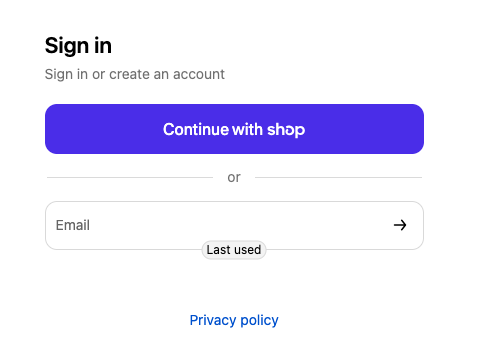
Pass-wordless login is Yari Flow’s native login experience and requires no additional setup.
Customer login options
Yari Flow supports several customer login configurations. The best option depends on whether you prioritize a streamlined subscription experience or need Shopify’s native login to support other customer-facing apps.
The table below outlines the available options.
Shopify customer account types and login behaviour
Your Shopify customer account type determines how customers authenticate and which Yari Flow login options are available.
The right setup depends on whether your store uses Shopify’s new customer accounts or legacy customer accounts, and whether Shopify login is required for other app integrations.
New customer accounts
Shopify’s new customer accounts provide a modern, passwordless login experience but have some limitations when used with Yari Flow.
Stores using new customer accounts should expect customers to authenticate through Shopify before accessing their subscriptions through Yari Flow’s My Account.
Key characteristics:
- Passwordless login managed by Shopify
- Multipass is not supported
- Customers must authenticate separately to access the Yari Flow My Account
Legacy customer accounts
Legacy customer accounts use Shopify’s traditional email-and-password login and support more advanced authentication integrations.
Key characteristics:
- Password-based login
- Multipass is supported for stores on Shopify Plus
- Automatic login synchronization between Shopify and Yari Flow is available through Multipass
Legacy customer accounts provide the most flexibility when combining Shopify login with Yari Flow, particularly for Shopify Plus stores using Multipass.
Selecting the right option
Use the guidance below to determine which setup is the best fit for your store.
Direct Yari Flow login is the best fit if you:
- Want the fastest and simplest subscription login experience
- Do not rely on apps that require Shopify’s native login
- Want full access to Yari Flow’s subscription management, analytics, and customer event data
Shopify login options are the best fit if you:
- Use loyalty, review, or account-based apps that require Shopify authentication
- Want customers to access multiple tools through their Shopify account
- Use Shopify Plus and want automatic authentication through Multipass
Define Customer account main menu
To customise the menu customers use to access the My Account, go to: Shopify Admin → Content → Menus
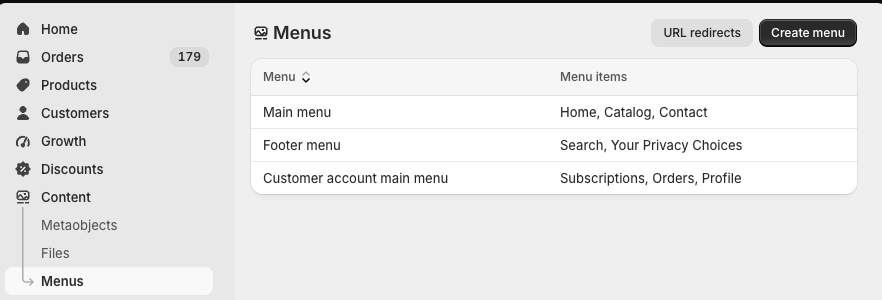
Create or open a menu called Customer account main menu. From here, you can add, edit or reorder the menu items shown to customers.
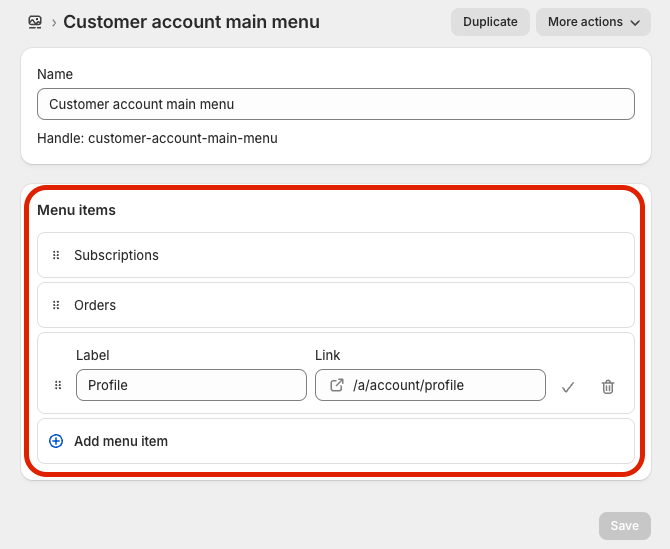
Log in as the customer
As a special need to log in as the customer, go to: Yari flow Dashboard → Customers, then select the customer.
Select Login As Customer to access the customer’s My Account experience.
This can help support teams:
- Reproduce an issue reported by the customer
- Confirm which subscription actions are available
- Review how products, orders and account information are displayed
- Guide the customer through their account experience
Only use this action when required for customer support and follow your organisation’s account-access and privacy procedures.

